
Rachio
RachioHouse & Home
4.83.12K Reviews
- Version
- 4.22.1
- Installs
- 500.00K
- Age Rating
- Everyone
Screenshots
Our Review of Rachio
 Analysis by Appyee
When I judge a watering app, I care about more than whether it can start a sprinkler from my phone. I want to know what I’m being asked to set up, which choices remain in my hands, and whether the convenience suits the way I actually look after a yard. Rachio is a free House & Home app from Rachio, built around managing irrigation through a compatible sprinkler controller. Its average rating is 4.8 from around 19,000 ratings, and it has over 500,000 installs. Those figures suggest broad interest, but the practical question is whether its setup and controls make sense for your garden.
What trust means for a connected watering system
A sprinkler controller is different from a casual home app: its decisions affect plants, outdoor water use, and the condition of a yard while you may be away. I would approach it as a tool that needs sensible setup and occasional attention, not as something to install and forget without checking the results. That distinction matters most when a schedule is first created or when the weather changes in a way your garden does not handle well.
The app’s purpose is clear, but trust also depends on the controller and installation working as expected. Before relying on automatic watering, I’d confirm that every zone is named correctly and that the schedule matches what is physically planted there. A schedule can look tidy on a screen and still be wrong for a shaded bed, a sunny patch, or a lawn with different soil. Taking time to review those details is a more useful safeguard than assuming automation will understand the yard without guidance.
Choices I would check before relying on automation
Rachio is free to download, though in-app purchases are listed at $29.99 to $49.99 per item. I’d treat that as a reason to check what is included for the controller you plan to use before spending money, rather than assuming the app alone supplies all the equipment or capabilities. The app is rated for Everyone, and its current version is 4.21.14, with Android support beginning at version 8.0.
The central user choice is how much to hand over to a schedule and how much to adjust manually. I would start by entering careful details, then observe a few watering cycles before deciding that the routine is right. If a particular area stays wet longer than expected, or a plant bed dries out sooner than the lawn, I would correct the zone information or revise the plan rather than simply increasing watering everywhere. That small, zone-by-zone habit helps keep automation from becoming a blunt instrument.
When garden details become sensitive in practice
Setting up a watering plan means describing the yard in useful detail, including plant types, soil, and sun exposure. Those are ordinary gardening facts, but they still shape a profile of how your home is maintained. I’d enter only what I can reasonably assess and avoid treating a suggested schedule as unquestionable. The details are valuable because they can make watering more tailored; they also make accuracy important, since a mistaken description can lead to a routine that does not suit the real space.
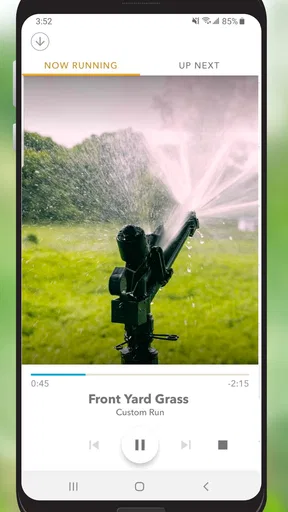
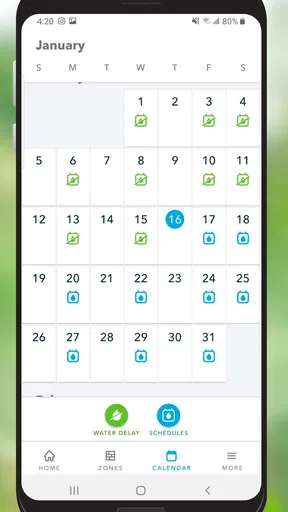
Remote control is handy, but it also creates a moment worth thinking through: if you are away, you may be making decisions based on what the app shows rather than what you can see in person. Before leaving for a trip, I’d check the upcoming schedule and make sure the zones are behaving normally. If a watering notification arrives, I’d use it as a prompt to inspect the situation where practical, not as proof that every plant received exactly the right amount.
Getting Started with Rachio
First things first, setting up the app is a breeze. Even if you’re not the most tech-savvy person, the app guides you through the installation process with clear, step-by-step instructions. I found it pretty intuitive; I was up and running in no time.
Once you've got everything connected, the app asks for some details about your lawn and garden. You’ll need to input information like plant types, soil, and sun exposure. This might seem a bit tedious, but trust me, it’s worth it for the personalized watering schedule you’ll get in return.
Features That Stand Out
What really sets the app apart is its smart scheduling capabilities. It uses weather forecasts and your garden's specific needs to create an efficient watering schedule. No more wasting water on rainy days or overwatering your plants – the app handles it all.
Another cool feature I loved was its integration with smart home systems. Whether you use Alexa, Google Assistant, or Apple HomeKit, you can control your sprinklers with just your voice. It’s like living in the future!
Let’s not forget about the notifications. You’ll receive updates about your watering schedule, weather changes, and even technical issues, keeping you in the loop at all times.
Using the Rachio App
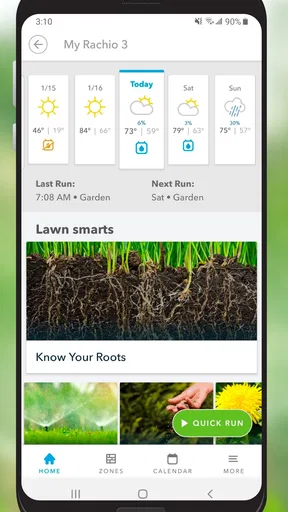
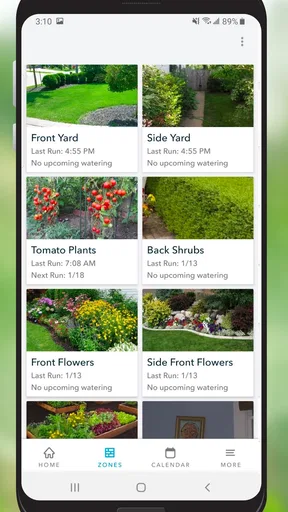
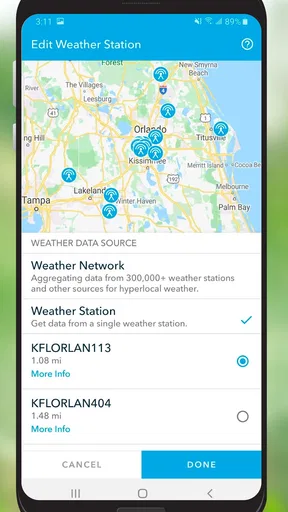
As you navigate through the app, you’ll notice how user-friendly it is. The interface is clean and straightforward, making it easy to find what you need. I was a fan of the dashboard, which provides a comprehensive overview of your watering zones and schedules.
If you're into data, you’ll appreciate the water usage stats. It's fascinating to see how much water you’re saving thanks to the smart scheduling. Plus, the app even provides tips on how to further optimize your water usage.
Why You’ll Love It
Let’s talk about convenience. Being able to control your sprinkler system from anywhere is a game-changer. Imagine you’re on vacation, and there’s an unexpected dry spell at home. No worries – just whip out your phone and adjust the watering schedule with a few taps.
Additionally, the app's ability to tailor watering schedules based on real-time weather data is a massive plus. This feature not only conserves water but also ensures your garden gets exactly what it needs.
Putting the schedule to a practical test
A useful way to assess an automated routine is to compare its plan with what you observe outside. On a normal weekday, I’d check the dashboard before leaving home, note which zones are due, and then look at the beds and lawn after the cycle. If one area seems consistently different from the others, that points to a setup detail worth revisiting instead of a reason to abandon the whole system. This is especially helpful in yards that mix grass, shrubs, and containers, where a single watering pattern rarely suits everything equally well.
Weather-based scheduling is most valuable when it prevents a routine from running mechanically through changing conditions. Still, local conditions can vary across a small property: a covered corner may stay damp while an exposed strip dries quickly. My practical tip is to use weather adjustments as a starting point and let what you see in each zone inform later changes. The app can help coordinate the schedule, but a quick visual check remains a better judge of plant health than assuming one forecast represents every part of the garden.
Who benefits most, and who may prefer another approach
I’d recommend this kind of app to someone who already has a compatible sprinkler setup, several zones to manage, and a real interest in reducing routine guesswork. It is particularly appealing if you travel, work irregular hours, or often forget to change a schedule after rain or a shift in the weather. A gardener who enjoys monitoring water use may also find the dashboard and usage information useful for spotting patterns over time.
It is less compelling for a small balcony with a watering can, a yard that needs only occasional manual watering, or someone who wants no connected equipment and no initial configuration. A basic timer may be the better choice if your garden has simple, stable needs and you do not care about remote adjustments or weather-aware scheduling. Likewise, if you prefer to decide every watering by looking at the soil yourself, automation may feel like an extra layer rather than a genuine convenience.
Compared with a conventional timer, the key difference is not simply phone control: it is the possibility of adjusting a plan around garden details and weather rather than repeating the same fixed routine. That can be a meaningful improvement, but it also asks more of you at setup. A timer is simpler and less dependent on profile accuracy; this app-based approach has more room to adapt, provided you keep the zone information and schedule sensible.
Small habits that make control more dependable
I would give each zone a name that describes its real location and plants, rather than leaving labels that are hard to distinguish. That makes a quick schedule review more useful and reduces the chance of changing the wrong area when you are in a hurry. If a zone covers mixed planting, I’d be cautious about treating it as uniform; plants with different watering needs may call for separate irrigation arrangements, not just a different setting in the app.
Notifications are helpful as reminders, but I would decide in advance which ones need action and which are simply informational. When an alert points to a technical issue, checking the controller and the affected zone is more useful than repeatedly changing the schedule from the phone. This keeps troubleshooting grounded in the actual system and avoids masking a physical problem with a temporary adjustment.
For a household, remote access can be convenient, but it is worth agreeing on who makes schedule changes. If two people adjust watering independently, one person may undo a change the other made without realizing it. I’d keep the routine simple and communicate any temporary changes, especially before travel or during a dry spell. That is not a special feature; it is a sensible way to keep a connected household tool predictable.
Living with the trade-offs
One trade-off is that an automated schedule can create a false sense of certainty. Weather forecasts and garden profiles help the app make decisions, but neither removes the need to notice a leaking head, a blocked sprinkler, or a newly planted bed that needs different care. I would still walk the yard occasionally while watering is underway. That check can reveal coverage problems that a clean dashboard cannot show.
Another consideration is dependence on a connected controller and a phone-based workflow. If you are uncomfortable configuring equipment or prefer every control to be immediately visible at the timer itself, a simpler system may feel more reassuring. The setup process may be approachable, but there is still real work in describing zones accurately and learning how your own garden responds. I see that as a fair exchange for remote oversight, not a reason to expect effortless results from day one.
The developer is Rachio, and the app has been available since May 14, 2014. Its longevity and adoption can offer context when comparing options, but I would not use popularity alone to decide whether it fits a particular property. The decisive questions are more personal: whether you have a compatible irrigation arrangement, whether your garden has enough complexity to benefit from scheduling, and whether you are willing to review the setup after seeing it operate.
Final Thoughts
So, is it worth it? In my opinion, absolutely. It’s a perfect blend of technology and practicality that brings ease and efficiency to garden maintenance. Whether you’re a gardening novice or a seasoned pro, this app offers something valuable for everyone.
If you're looking to save time, conserve water, and keep your garden thriving, give it a try. It’s a smart investment that pays off with healthier plants and a happier you.
My cautious recommendation
I would try it when you have an irrigation system to manage and can spend a little time checking the initial zone setup. Start with a modest, understandable schedule, watch how the yard responds, and make targeted changes rather than revising everything at once. That approach makes it easier to tell whether weather-based adjustments and remote access are genuinely helping your routine.
The app is free, while in-app purchases range from $29.99 to $49.99 per item, so I’d review the purchase details that apply to your intended setup before committing to anything. For people who want a connected way to oversee multiple watering zones, it has a clear practical purpose. For a tiny garden or someone who values manual control above convenience, a simple timer or hands-on routine may be the more satisfying choice. My recommendation is positive but conditional: the best results come when automation supports your judgment rather than replacing it.
Verdict
Strengths of Rachio
- Easy setup process for all users.
- Smart weather-based scheduling.
- Integrates with smart home systems.
- Remote control via mobile app.
- Water usage reports and savings.
Limitations of Rachio
- Requires strong Wi-Fi connection.
- Limited manual control options.
- Initial cost can be high.
- Compatibility with older systems may vary.
- Some features need a subscription.
Similar Picks in This Category
View All
Universal TV Remote Control
CodeMatics Media Solutions3.9

AlfredCamera Home Security app
Alfred Systems Inc.4.7

Planner 5D: AI Home Design
Planner 5D4.5

Universal Tv Remote-Cast to TV
One Music Player4.1

Zillow: Homes for Sale & Rent
Zillow Group4.8

99acres Buy/Rent/Sell Property
infoedge.com4.3
Frequently Asked Questions
What is Rachio and how does it work?
Rachio is a smart sprinkler controller that allows you to manage your lawn watering schedule through your smartphone. It connects to your existing irrigation system and uses weather data to adjust watering times automatically, helping you conserve water and maintain a healthy lawn. The app provides detailed reports on water usage and offers customization options to suit your landscaping needs.
Is Rachio compatible with my current sprinkler system?
Rachio is designed to work with most standard sprinkler systems. Before purchasing, it's essential to check the compatibility with your existing setup. The app supports a variety of sprinkler heads and valves, but it’s recommended to verify specific models on the Rachio website or consult customer support for assurance.
How does Rachio help in saving water?
Rachio uses local weather forecasts and soil moisture data to create a personalized watering schedule, ensuring your lawn gets the right amount of water without wastage. By adjusting watering times based on rainfall, humidity, and temperature, Rachio can significantly reduce water consumption, contributing to both environmental conservation and cost savings on your water bill.
What features does the Rachio app offer?
The Rachio app provides a comprehensive set of features, including real-time notifications, detailed water usage reports, and the ability to control your irrigation system remotely. It supports multiple schedules and zones, allowing for precise watering control. Additionally, the app integrates with smart home systems like Amazon Alexa and Google Assistant for voice command operation.
Is it difficult to install and use the Rachio system?
Installing Rachio is straightforward, with a user-friendly setup process. The app provides step-by-step guidance, and there are numerous online resources and customer support options if needed. Using the app is intuitive, with a clean interface that makes managing your watering schedule easy, even for those not technically inclined.
